
Gone Not Forgotten - Recovering a Deleted Message from SQLite Free Space
TL;DR
(This is a writeup/walkthrough of a medium difficulty forensics CTF challenge, from H7 CTF Quals 2026.)
When content is deleted from an SQLite database, the content is not usually erased but rather the space used to hold the content is marked as being available for reuse. This can allow deleted content to be recovered by a hacker or by forensic analysis. I showcase a simple CTF example of this.
The Scenario
We are given the following description.
A phone lands on the evidence bench for a harassment case, and the suspect is adamant they never sent anything ugly. Nova Messenger agrees with them: nothing there.
Deleting a thing and being rid of it were never the same move.
And two files, messages.db and a secure.xml file with these contents
<?xml version='1.0' encoding='utf-8' standalone='yes' ?>
<map>
    <string name="obfuscation_key">n0v4ch4t</string>
    <string name="stored_body_encoding">hex(xor(body, obfuscation_key))</string>
    <boolean name="biometric_lock" value="true" />
</map>
So, let’s think about this. We have a phone in our hands, and we dig into a messaging app. We find the 2 files mentioned above, and we now want to do some forensics analysis to prove that the suspect did send something ugly.
secure.xml seems to contain encoding information, which will probably be useful down the line, but it doesnt help us a lot by itself. We’re gonna have to dig into the messages.db file.
Analysis
Before doing anything let’s see what we are working with. It is always a good idea to run file on whatever he have on our hands.
$ file messages.db
messages.db: SQLite 3.x database, last written using SQLite version 3039002, file counter 9, database pages 3, cookie 0x1, schema 4, largest root page 3, UTF-8, version-valid-for 9
So we have an SQLite3 database. Let’s inspect further and see what tables it contains.
sqlite> .tables
messages

sqlite> .schema 'messages'
CREATE TABLE messages(_id INTEGER PRIMARY KEY, thread TEXT, sender TEXT, ts INTEGER, body TEXT);
Alright. A single “messages” table. Seems reasonable, coming out of a file called messages.db. Let’s the the rows.
sqlite> SELECT * FROM 'messages';
1|general|alice|1710001000000|lunch at 1?
2|general|bob|1710001100000|sure, the usual spot
3|general|alice|1710001200000|cool, see you
5|ops|mallory|1710002050000|burn this after you read it
6|general|bob|1710002100000|anyone seen the build?
7|general|carol|1710002200000|ci is green now
Okay. Now we have a much better idea of what is going on. We notice that message with _id 4 is missing, and message 5 is saying “burn this after you read it”
That is suspicious, to say the least. We are obviously gonna have to try and recover message 4.
Recovery
It is mentioned in several pages of SQLite docs that deleted data may still be intact. Example 1, Example 2
So let’s try the simplest of things first, before doing anything sophisticated. Good old strings.
$ strings messages.db
SQLite format 3
Ktablemessagesmessages
CREATE TABLE messages(_id INTEGER PRIMARY KEY, thread TEXT, sender TEXT, ts INTEGER, body TEXT)
+generalcarol
ci is green now,
9generalbob
W anyone seen the build?1
Copsmallory
burn this after you read it
yopsmallory
26073560251303150a564f025a5d521658054357545d064c5f000b%
'generalalice
cool, see you*
5generalbob
sure, the usual spot#
#generalalice
@lunch at 1?
Now, we immediately notice something interesting. Right after the suspicious message, we see this string: 26073560251303150a564f025a5d521658054357545d064c5f000b%
This could very well be the deleted message 4. But it is obviously encoded/encrypted in some way. This is the time for secure.xml to shine.
Looking back at the xml:
<string name="obfuscation_key">n0v4ch4t</string>
<string name="stored_body_encoding">hex(xor(body, obfuscation_key))</
We know that both hex and xor are reversible operations. Let’s try to decode the mysterious string.
The hypothesis is that message 4 is encrypted as:
ct = hex(xor(pt, n0v4ch4t))
Therefore the plaintext should be
pt = xor(fromhex(ct), n0v4ch4t)
Let’s put this into the test. We can simply use CyberChef, a tool that will do all decoding for us!
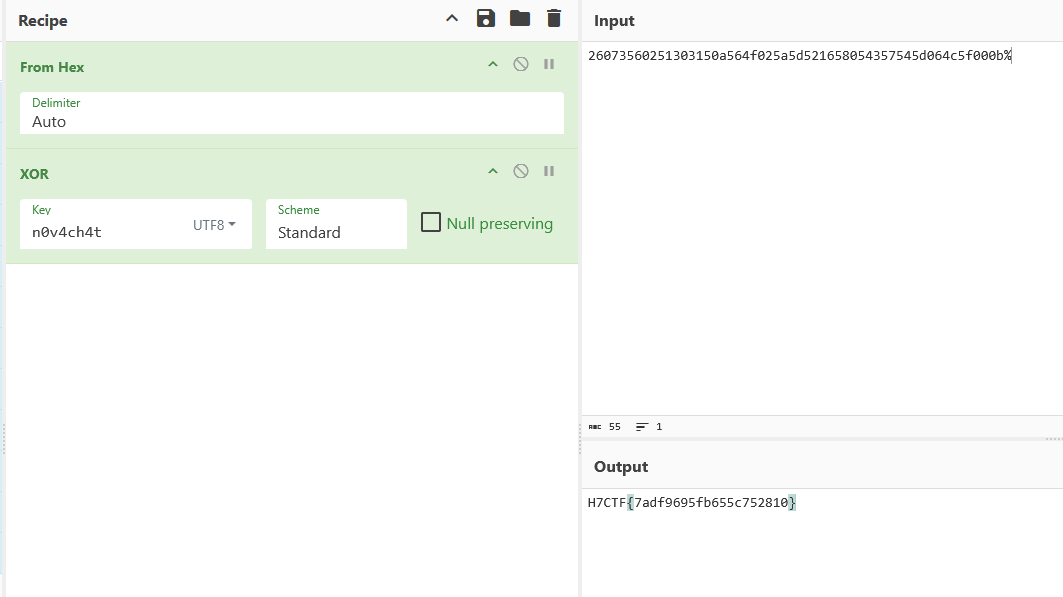
That was it! We got ourselves a flag!
flag: H7CTF{7adf9695fb655c752810}
Takeaways
This is a beginner friendly challenge, but we can learn a few things from it.
-
Don’t blindly trust an app showing no data, especially if you have a reason to suspect that something might be there. Always dig deeper.
-
Just because something is deleted, doesn’t mean it’s truly gone. To be safe, set PRAGMA secure_delete=ON so that deleted content actually gets overwritten with zeros.